Best Online Scrapbook Makers in 2026 (Honest Buyer's Guide)
Summary This guide ranks and compares the best scrapbook makers available online in 2026. You will learn exactly what features to look for, how each platform stacks up on ease of use, templates, export options, collaboration, and price. Whether you are preserving travel memories, family milestones, or school projects, this list helps you pick the right tool without wasting time on trial and error. Wanderbuk is highlighted as a standout choice for travel-focused scrapbooking, though several strong platforms are covered here.
Introduction
Finding a good scrapbooking online platform is harder than it should be. Most tools either bury you in complexity or strip out the features that make a scrapbook feel personal. The market has grown significantly, and with it comes an overwhelming number of options — from browser-based drag-and-drop editors to subscription-heavy design suites. This guide cuts through the noise. If you want a clear answer on which scrapbook makers are worth your time in 2026, you are in the right place. We will cover what matters, what does not, and how to choose based on your actual use case rather than marketing copy.
Not sure what a digital scrapbook actually is? Start with What Is a Digital Scrapbook? before diving into the comparison.
1. What to Look for in an Online Scrapbook Creator
The right online scrapbook creator depends almost entirely on how you plan to use it. Before comparing platforms, you need to know which five features actually drive the quality of your finished scrapbook.
Step 1 — Evaluate ease of use. Open a free trial and build one page from scratch. If it takes more than ten minutes to produce something that looks good without reading a tutorial, the interface is too steep for casual use.
Step 2 — Check the template library. Templates are the backbone of any digital scrapbooking site. Count not just the number, but the range of styles. A platform with 500 generic birthday templates and nothing for travel, school, or seasonal themes will hit a wall fast.
Step 3 — Test export options. A beautiful scrapbook that only lives inside one app is a liability. Look for PDF export at a minimum — ideally high-resolution PDF, print-ready files, and the ability to share links without requiring the viewer to create an account.
Step 4 — Understand collaboration features. If you are building a shared family album or a group travel book, real-time collaboration or at least invite-and-contribute workflows are non-negotiable. Many platforms charge extra for this.
Step 5 — Calculate the real cost. Free tiers often cap the number of pages, projects, or exports. Map out what you will actually need over six months and price it honestly — including the cost of premium templates and additional storage.
2. The Core Features Compared Across the Best Digital Scrapbooking Sites
The best digital scrapbooking sites share a short list of capabilities that separate serious tools from gimmicks. Here is how to evaluate each one in practice.
2.1 Template Quality and Variety Templates should do more than set a background color. Strong platforms offer layout grids, sticker sets, typography pairings, and themed kits that match specific occasions — road trips, weddings, first days of school, and seasonal events. If the template library does not evolve with regular additions, the platform is stagnating.
2.2 Media Handling Your photos are the whole point. The best electronic scrapbook tools support bulk uploads, automatic image optimization, and drag-to-resize without quality loss. Watch for platforms that compress your photos on upload — what you see in the editor may not match the exported file.
2.3 Text and Typography Captions and journaling entries give a scrapbook its voice. Look for at least 20 font options, adjustable line spacing, and the ability to layer text over images cleanly. Platforms that limit you to three font families or lock text to preset boxes will frustrate you quickly.
2.4 Stickers, Embellishments, and Custom Assets The decorative layer is what makes a scrapbook feel handmade rather than printed. A good virtual scrapbook tool includes clipart, stickers, borders, and washi tape effects — and ideally lets you upload your own PNG assets so you can add personal artwork or brand elements.
2.5 Sharing and Export Export to high-res PDF is the baseline. Beyond that, look for shareable links, print-on-demand integration (so you can order a physical book), and social sharing. Some platforms charge per export, which adds up fast if you are producing multiple projects.
3. How Wanderbuk Stands Out for Travel Scrapbooking
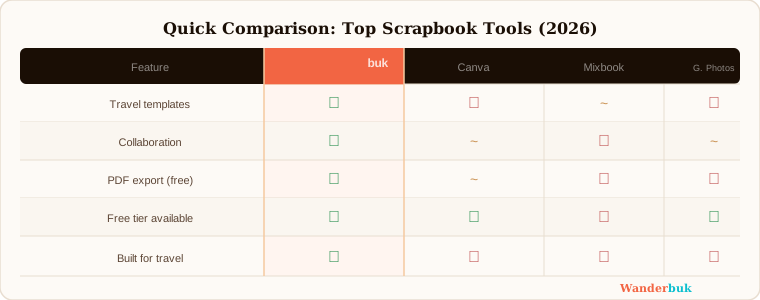
Wanderbuk earns its place on this list because it was built specifically around travel memories, not adapted from a generic design tool. If your primary use case is documenting trips, it is the best digital scrapbook maker for travelers on the market right now.
What sets it apart from other online scrapbook companies is the template library. Rather than generic layouts repurposed for travel, Wanderbuk's templates are organized around actual trip structures — arrival days, itinerary pages, restaurant logs, hiking routes, and final reflection spreads. Each template accounts for the kinds of photos travelers actually take: landscapes, street scenes, group shots at landmarks, and food close-ups.
The free PDF export is a meaningful differentiator. Many competing platforms gate high-resolution export behind paid tiers. Wanderbuk offers it on the free plan, which means you can produce a shareable, print-quality document without committing to a subscription. For anyone who wants to send a trip recap to family or keep a personal archive, that matters.
Collaboration is also handled well for group travel. Multiple contributors can add photos and captions to the same project, which makes it practical for friend groups or family trips where everyone has photos worth including.
If travel is your main use case, start scrapbooking online for free and build your first trip page before committing to anything paid elsewhere.
4. What the Other Leading Platforms Do Well
Several other platforms deserve honest credit for specific strengths that may matter depending on your use case.
4.1 Canva Canva is the most accessible entry point for anyone new to scrapbooking online. Its drag-and-drop interface requires almost no learning curve, and the free tier is genuinely useful. The limitation is depth — Canva's templates are broad but shallow, and it lacks the kind of themed, occasion-specific kits that dedicated scrapbooking tools offer. It is a strong choice if you want flexibility and already use it for other design work.
4.2 Mixbook Mixbook is the strongest platform for users who want a physical product at the end. Its print quality is consistently rated among the best, and the editor is polished. The trade-off is cost — premium templates and print orders add up, and the free tier is limited enough to feel like a demo rather than a working tool.
4.3 Smilebox Smilebox focuses on animated scrapbooks and digital slideshows, which gives it a niche that other platforms do not fill. If you want to share a living, moving memory book rather than a static PDF, it is worth evaluating. It is less suited to producing print-ready files.
4.4 Scrapbook.com Digital Studio This platform is built for enthusiast scrapbookers who want granular control over every element. The asset library is enormous, and the community around it is active. The learning curve is steep, and the interface feels dated compared to newer tools. It rewards patience but is not the right starting point for casual users.
5. How to Choose the Right Platform for Your Needs
Choosing between these platforms comes down to three honest questions.
Step 1 — Define your primary use case. Travel memories, family milestones, school projects, and business portfolios each have different template and feature requirements. Match the platform to the job, not the other way around.
Step 2 — Decide whether you need a physical product. If printing a book is the goal, prioritize Mixbook or another platform with strong print integration. If digital sharing and PDF export are sufficient, your options expand significantly.
Step 3 — Test before you commit. Every platform on this list offers a free tier or trial. Spend twenty minutes building a single page on your top two choices. The one that feels faster and produces a result you are proud of is the right answer, regardless of what any comparison article says.
For a practical walkthrough of building your first project, see How to Create a Travel Photo Album and How to Make a Collaborative Photo Book.
Final Thoughts
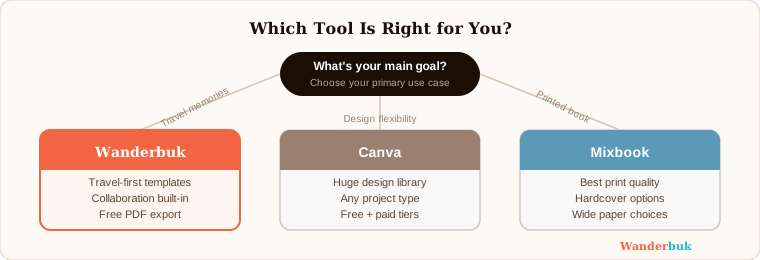
The best scrapbook makers in 2026 are more capable and accessible than ever, but the right choice is still personal. If travel is central to how you use a scrapbook, Wanderbuk's purpose-built templates and free export make it the strongest starting point. If you need broad design flexibility, Canva fills that role. If a printed book is the end goal, Mixbook is the most reliable path.
Start with your use case. Test with a real project. The platform that helps you finish something will always beat the one with the longest feature list.