How to Make a Collaborative Photo Book for Group Trips
Summary This guide explains how to create a collaborative photo book that everyone in your group can contribute to — whether you're capturing a family reunion, a wedding, or a friend trip abroad. You'll learn how to organise contributors, collect photos from multiple people, keep the book visually coherent, and turn scattered memories into one polished keepsake. Practical steps throughout, with tips for groups of all sizes.
The Problem With Group Trip Photos
After every group trip, the same thing happens. Hundreds of photos live across a dozen phones, nobody gets around to sharing them all, and the memories slowly dissolve. A collaborative photo book solves this by giving everyone a single place to contribute — so the whole story gets told, not just one person's version of it.
The good news is that making a collaborative photo book is now straightforward, even for groups that aren't particularly organised. This guide walks you through the process from start to finish.
1. Understand What a Collaborative Photo Book Actually Is
A collaborative photo book is a shared digital album where multiple people can add photos, captions, and notes — but one person controls the final layout and design. It's different from a simple shared photo album because the output is a structured, designed book rather than a pile of uploads. Think of it as a group trip photo book with editorial control still in one place.
The distinction matters. Without some structure, collaborative projects turn into chaos — 400 raw photos with no context, duplicate shots, and no narrative thread. A good collaborative scrapbook keeps contributions open while keeping the final product coherent.
Common use cases: - Multi-family holidays or group travel with friends - Family reunions where different generations have different photos - Weddings, where guests capture angles the photographer missed - School or sports trips where a group leader wants everyone's perspective - Year-in-review books compiled from multiple contributors
2. Plan Before You Invite Anyone
The structure of your collaborative photo book should be decided before contributions start coming in. Trying to organise chapters retroactively is far harder than setting them up upfront.
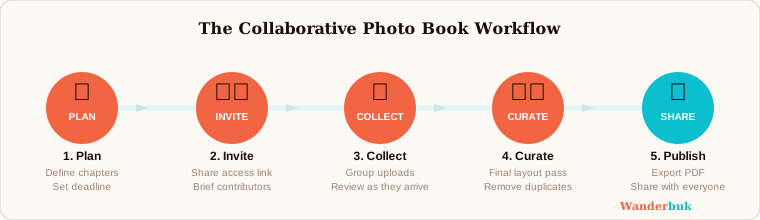
Step 1: Define your sections. Break the book into logical chapters — by day, by location, or by theme. For a two-week group trip, you might have one chapter per destination. For a wedding, you might divide by ceremony, reception, and candid moments.
Step 2: Set a deadline. Open-ended contribution windows drag on forever. Give contributors a specific date by which their photos and notes need to be in. Two weeks after the trip ends is a reasonable window for most groups.
Step 3: Decide on the scope. Will contributors add only photos, or can they write captions and notes too? Knowing this upfront helps you brief your group clearly and prevents confusion later.
Step 4: Choose your platform. Pick a tool that supports contributor access without giving everyone full editing rights. You want contributors to add content, not accidentally rearrange your layout.
3. Set Up Contributor Access Correctly
Getting the permissions right is the most overlooked step in any group photo book project. Most groups make the mistake of either locking everyone out or giving everyone too much control.
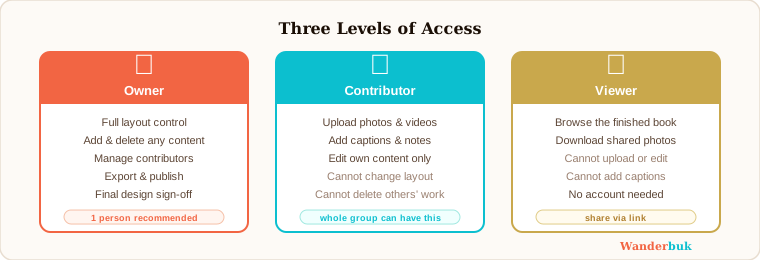
The right model is tiered access: the book owner controls the layout and final design, while contributors can add photos and notes to designated sections. This prevents the finished product from being a design-by-committee mess while still capturing everyone's memories.
On Wanderbuk, you can create a collaborative travel scrapbook and invite contributors who can add photos and notes without touching the layout. The owner keeps full control over the final arrangement, which means the book stays coherent even when twenty people are adding content from different countries and time zones.
Step 1: Create the book and set up your chapter structure first.
Step 2: Invite contributors via a link or email. Assign them contributor-level access, not editor access.
Step 3: Brief your group clearly — tell them which sections to add to, what kinds of photos you're looking for, and the deadline.
Step 4: Check contributions as they come in. Don't wait until the deadline to review — catching duplicates or off-topic uploads early saves time later.
4. Brief Your Contributors Well
The quality of a group trip photo book depends almost entirely on how well you brief your contributors. A vague "just send me your photos" produces a flood of untagged files with no context. A clear brief produces usable content.
A good contributor brief covers four things:
- What to include — specific moments, people, or places you want captured (the ones you might have missed yourself)
- What to skip — blurry shots, near-duplicates, or photos of food that add nothing to the story
- How to label — ask contributors to add a caption or a short note with each photo so context isn't lost
- Where to upload — one link, one location, no ambiguity
If your group is large, consider assigning a "section lead" for each chapter. That person is responsible for curating their section down to the best 10–15 photos before you do your final layout pass.
5. Curate, Don't Just Collect
The most common mistake in any collaborative scrapbook project is treating more as better. A 300-page book of every photo anyone took is not a keepsake — it's an archive. Curation is what turns a collection into a story.
Step 1: Do a first pass for quality. Remove blurry, dark, or badly framed shots. This isn't about being harsh; it's about making the book enjoyable to read.
Step 2: Remove duplicates. In group trips, ten people often photograph the same moment from similar angles. Pick the best one.
Step 3: Check for narrative gaps. Look at your chapter structure and identify any moments that aren't represented. This is the time to ask specific contributors if they captured something you're missing.
Step 4: Aim for 8–15 photos per chapter. This is enough to tell the story of a day or a location without overwhelming the reader.
6. Keep the Design Coherent
Coherent design is what separates a collaborative photo book from a random shared photo album. When contributions come from multiple sources, it's easy to end up with a book that feels visually inconsistent.
A few principles that solve this:
- Stick to one or two fonts throughout. Don't let each section look like a different person designed it.
- Use consistent layouts. A grid-heavy page next to a full-bleed photo spread can work — but only if it's intentional.
- Let the photos drive the mood. If a section is adventurous and high-energy, layouts should reflect that. A slower, quieter evening deserves more breathing room.
- Write a unifying narrative. Even three or four sentences at the start of each chapter that set the scene make a huge difference to how the book reads.
The owner of the book should do a final layout pass after all contributions are in. This is where you override anything that breaks visual consistency and make sure the book reads as one coherent piece rather than a stitched-together collage.
7. Export and Share the Finished Book
Once the layout is finalised, it's time to get the book out to everyone who contributed.
Step 1: Export a high-resolution PDF for printing. If anyone in the group wants a physical copy, this is the format to use.
Step 2: Create a shareable digital version. Most platforms let you share a link to the finished book so contributors can see the final result without needing to log in or create an account.
Step 3: Distribute to contributors. Send the link or file to everyone who added photos. People are far more likely to treasure something they helped create — seeing their photos in the finished book is its own reward.
If you've never made a digital scrapbook before, start with the guide What Is a Digital Scrapbook? to understand the format. For the full visual design process, How to Create a Travel Photo Album covers layout decisions in more detail.
Start Your Collaborative Photo Book Today
A group trip is made by everyone in it. The photos, notes, and small moments that each person captures together form a fuller picture than any one person could create alone. A collaborative photo book captures that — and it's easier to make than most people expect.
The key is starting with structure, briefing your contributors clearly, and keeping editorial control with one person. Do that, and the book almost builds itself.
Invite your group and start for free — no design experience needed. See also Best Online Scrapbook Makers for a comparison of tools if you want to explore your options first.
Related reading: What Is a Digital Scrapbook? — How to Create a Travel Photo Album — Best Online Scrapbook Makers