Digital Scrapbook: The Complete Guide to Preserving Travel Memories Online
Summary: This article explains what a digital scrapbook is and why it beats paper for modern travellers. It walks you through choosing the right online scrapbook creator, picking templates, and building your first scrapbook step by step. You will also find tips for organising photos, adding context to memories, and sharing finished scrapbooks with family and friends.
There has never been a better time to keep a digital scrapbook. Every trip generates hundreds of photos, boarding passes, hand-written notes, and ticket stubs — and most of it disappears onto a hard drive, never to be seen again. A digital scrapbook pulls all of that into one shareable, searchable, and beautifully designed space. Whether you have just returned from a trip through Patagonia or are still planning your next adventure, this guide covers everything you need to get started.
1. What Is a Digital Scrapbook?
A digital scrapbook is an online collection of photos, captions, maps, and mementoes arranged on designed pages, exactly like a traditional paper scrapbook — but stored in the cloud, editable at any time, and shareable with a single link. Unlike a plain photo album, a scrapbook lets you layer context: where you were, what you felt, who you were with, and why that moment mattered. For travellers, that context is the difference between a folder of JPEGs and a story worth revisiting for decades.
2. Why a Virtual Scrapbook Beats Paper
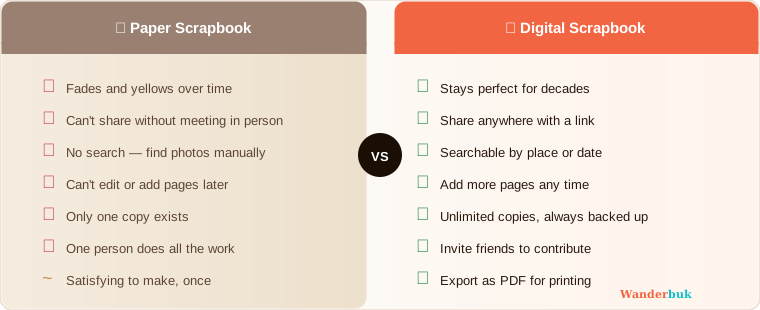
Paper scrapbooks are satisfying to make once and painful to update later. A virtual scrapbook solves every classic limitation.
- It never fades. Physical prints yellow; digital pages look identical in ten years.
- It travels with you. Open it on any device, from anywhere.
- It is easy to share. Send a link instead of lugging a heavy album to family dinners.
- It is searchable. Find the photo from "Jaisalmer, January" in three seconds.
- It grows incrementally. Add a single night's photos right after dinner rather than waiting until the whole trip is done.
For collaborative trips — group travel with friends, family holidays, couples journeys — the ability to let multiple people add their own photos to one shared book is something paper simply cannot match. See our guide to How to Make a Collaborative Photo Book for more on that.
3. How to Choose the Best Digital Scrapbook Creator
The best digital scrapbook creator is the one that removes friction between your photos and the finished page. When evaluating online scrapbook sites, look for five things.
- Template variety. A good library of digital scrapbook templates means you spend your time on photos, not on layout design from scratch. Look for themes matched to the type of trip — city breaks, hiking, beach, road trip.
- Drag-and-drop editing. If placing a photo requires resizing a canvas in image-editing software, the tool is too slow for real travel use.
- Mobile compatibility. You should be able to add photos from your phone the same evening you take them.
- Export options. A free PDF download means you can print a physical copy or archive the scrapbook locally without losing access.
- Collaboration features. Multiple contributors, comment threads, or shared editing all multiply the value of a group trip.
For a full breakdown of the top tools, read our comparison of the Best Online Scrapbook Makers.
4. Step-by-Step: How to Create Your First Digital Scrapbook Online
Creating an online scrapbook from zero to finished takes less time than you might expect. Here is the exact process.
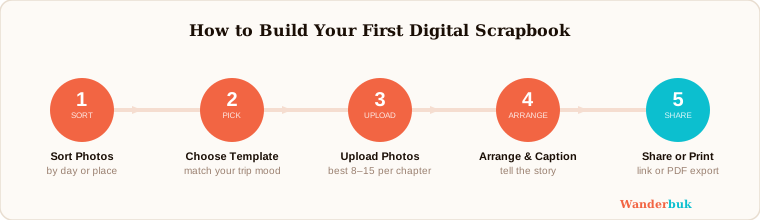
Step 1: Collect your raw material. Before opening any tool, gather everything you want to include — photos (sorted by day or location), any short notes you jotted in a travel journal, and scans of physical mementoes like tickets or stamps. A quick folder sort at this stage saves significant time later.
Step 2: Choose a platform and sign up. Start for free on an online scrapbook creator that fits the criteria above. Most tools offer a free tier that is sufficient for a single trip.
Step 3: Pick a template. Choose a template that matches the mood of your trip rather than trying to build pages from scratch. A desert road trip calls for warm tones and rustic textures; a coastal holiday suits clean blues and whitespace. Most platforms, including Wanderbuk, group templates by travel style so you can filter quickly.
Step 4: Upload and organise photos. Upload your photos in bulk, then drag them onto pages in chronological or thematic order. At this stage, do not worry about captions — just get the photos placed so you can see the visual rhythm of the book.
Step 5: Add captions, dates, and location tags. This is where the scrapbook separates itself from a plain gallery. Write one or two sentences per spread: what day it was, what surprised you, what you ate, who made you laugh. Specificity is what you will value most when you read this back in five years.
Step 6: Refine the layout. Adjust photo sizes, reorder pages, swap backgrounds, and add any decorative stickers or dividers the platform offers. Keep it readable — white space is your friend.
Step 7: Share or export. Share via link for immediate access, or download a PDF to print a physical copy. If you built the book collaboratively, notify co-contributors so they can see the finished result.
5. How to Organise Photos Before You Start Scrapbooking Online
Disorganised photos are the single biggest reason people abandon scrapbook projects halfway through. Use this sorting method before opening your editor.
Step 1: Sort by day. Create a folder for each day of the trip and drop photos into it during or just after the trip. Even a rough sort is far better than one giant folder.
Step 2: Cull ruthlessly. Keep the three to five best photos from each day. A spread with four strong images tells the story better than a page crowded with twenty.
Step 3: Name your folders descriptively. "Day 3 - Amber Fort" is infinitely more useful than "IMG_20260103." The folder name often becomes your page title.
Step 4: Separate hero shots from fillers. Identify one or two photos per day that anchor the narrative — the photo you would print and frame. These go front and centre; the rest support them.
For photo album-specific guidance, see How to Create a Travel Photo Album.
6. Tips for Writing Captions That Make Memories Last
Great captions do more work than most people realise. A caption is not a description of the photo — anyone can see what is in the photo. A caption is the detail the photo cannot show: the temperature, the smell, the name of the stranger who gave you directions, the argument you had and quickly forgot.
- Write in the past tense to preserve the sense of "this happened."
- Include a specific detail — a name, a price, a time of day.
- Keep captions under thirty words. Brevity is read; length is skipped.
- Ask yourself: "What would I want to remember about this moment in twenty years?" Answer that question, and nothing else.
7. How to Share Your Online Scrapbook
Sharing is where a digital scrapbook earns its advantages over paper.
Step 1: Review before sharing. Read through the finished book once as if you are seeing it for the first time. Fix obvious typos and check that all pages loaded correctly.
Step 2: Choose your sharing method. A private link works for family. A public link works for a travel blog or social media. Some platforms let you embed a preview directly into a webpage.
Step 3: Export a PDF backup. Before sharing widely, download the PDF. This gives you a permanent, platform-independent copy of the finished book.
Step 4: Notify your audience. A message with the link and one sentence of context — "Here is the Iceland trip scrapbook, pages 4–6 are yours to enjoy" — gets far more opens than a link sent cold.
If you want to create your digital scrapbook online and have it ready to share the same evening you land home, the process above can realistically be completed in under two hours for a week-long trip.
Conclusion
A digital scrapbook is not a project — it is a habit. Once you build one, the instinct to document and organise becomes automatic. The photos you take on future trips get a home, the stories you lived get told, and the memories you worked hard to make do not quietly disappear into a forgotten folder. Start with one trip, one template, and one evening. The rest follows naturally.