Travel Photo Album & Trip Photo Book: Your Complete Guide to Preserving Every Journey
Summary A travel photo album or trip photo book turns scattered phone photos into a story worth sharing. This guide explains why physical and digital formats both matter, walks through a step-by-step process for building your album from scratch, and shows you how to choose the right layout, add context, and hold onto the moments that matter most — without letting your photos rot in a camera roll forever.
Introduction
Creating a travel photo album is one of the highest-return things you can do with your trip photos. Most travelers return home with hundreds of images that never leave their phones. Within a year, the details blur — which town was that? Who took this shot? What day did we find that restaurant? A proper trip photo book answers all those questions before they disappear, and it turns a pile of raw photos into something you will actually revisit.
1. Why a Travel Photo Album Actually Matters
A travel photo album matters because memory degrades fast, and context degrades even faster. Research on autobiographical memory consistently shows that without deliberate encoding — writing, organizing, retelling — experiences fade to impressions within months. Your photos are evidence. Your album is the story they tell.
Beyond nostalgia, there are practical reasons:
- Sharing is easier. A single link or printed book beats forwarding 400 photos.
- Details survive. Captions carry the hotel name, the local dish, the unexpected detour.
- It becomes a travel keepsake. Unlike a social media post, a dedicated album is permanent and personal.
2. What to Decide Before You Start Building
The single most important pre-step is choosing your format, because that decision shapes every choice that follows.
Step 1 — Choose between digital and print (or both). Digital albums are searchable, shareable, and free to store. Printed trip photo books are tactile, giftable, and feel like real objects. Many travelers do both: build digitally, then export to print.
Step 2 — Pick your organizing principle. You have three main options:
- Chronological (day-by-day)
- By destination or city
- By theme (food, people, landscapes, architecture)
Chronological works best for single trips. By-destination works well for multi-country itineraries. Theme-based albums suit photographers who shoot a consistent subject across many trips.
Step 3 — Curate before you build. Do not import every photo. Aim for 60–100 images for a 7–14 day trip. Delete duplicates, discard blurry shots, and keep one best version of repetitive subjects (you do not need nine photos of the same temple).
3. How to Build Your Trip Photo Book: A Step-by-Step Process
Building a trip photo book is a five-step process that takes most travelers two to three hours for a full trip.
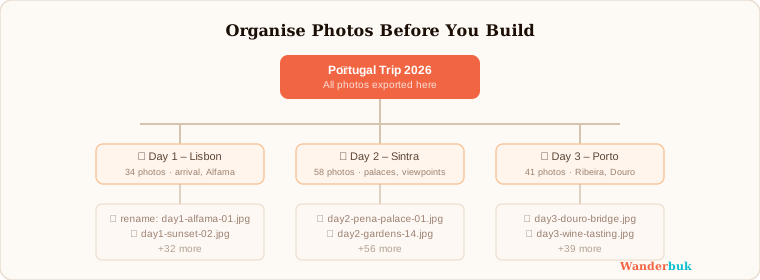
Step 1 — Export and organize your photos. Create a folder on your desktop named after the trip (e.g., "Portugal Oct 2026" or "Japan Mar 2026"). Sort images into subfolders by day or city. Rename files if the timestamps are out of order — many cameras drift after crossing time zones.
Step 2 — Select your cover image. The cover sets the emotional tone of the whole book. Choose a wide-format shot with strong composition and natural light. Portraits of people work well. Abstract landscapes can be striking but sometimes feel impersonal.
Step 3 — Build your layout page by page. Use a grid structure: one hero image per spread plus two to four supporting shots. Avoid filling every square centimeter — white space (or dark negative space) makes images breathe.
Step 4 — Write captions and context. Every spread needs at least one anchor caption that answers: where, when, and why this moment matters. Short is better. "Jaisalmer Fort at golden hour, Day 4" is more useful in ten years than a paragraph you wrote while tired.
Step 5 — Export and share. Export as a high-resolution PDF for printing, and as a compressed version for sharing digitally. Tools like Wanderbuk let you download a free print-ready PDF directly from your digital scrapbook, which removes the friction of juggling two separate workflows.
4. Layout Principles That Make Photos Look Professional
Good layout is not about design skill — it is about a few consistent rules applied every time.
4.1 The hero-support ratio Every page spread should have one dominant image (hero) occupying at least 50% of the visual space. Supporting images fill the rest. If every photo is the same size, none of them stand out.
4.2 Visual flow and reading direction Western readers scan left to right, top to bottom. Place your story's most important image in the top-left of a spread, then let the eye travel naturally to supporting detail.
4.3 Consistent borders and styles Pick one photo treatment and stick to it throughout. Polaroid-style borders, for example, create a cohesive handmade feel that works especially well for travel content. Mixing polaroids, full-bleed images, and rounded thumbnails on the same page looks chaotic.
4.4 Color palette discipline If you are adding background colors or accent elements, pull them from the photos themselves rather than choosing arbitrary brand colors. A desert trip looks right with warm sands and terracotta; a coastal trip calls for blues and whites.

5. Adding Text and Journaling Without Overwhelming the Photos
Text in a travel photo album should support the images, not compete with them. The best albums use text the way a documentary uses narration — sparingly, purposefully.
5.1 Three types of text that belong in a trip photo book
- Location labels — City, country, date. These are orientation anchors.
- Story captions — One to two sentences that give context the photo cannot convey alone.
- Journal entries — Optional, but powerful when you want to record a feeling or observation. Keep them to three to five sentences per spread maximum.
5.2 Typography rules Use no more than two fonts. One for headings, one for body text. Make sure there is enough contrast between your text color and the background — light text on busy photos is almost always unreadable.
6. Choosing a Travel Memories App or Tool That Fits Your Workflow
The right travel memories app depends on whether you prioritize flexibility, speed, or print quality.
6.1 What to look for - Drag-and-drop photo placement - Template options organized by destination or trip type - Export to PDF for printing - Easy sharing without requiring the recipient to download anything
6.2 Where Wanderbuk fits in If you want destination-specific templates that already match the aesthetic of a place (desert, mountains, coast, city), Wanderbuk's themed layouts remove the blank-canvas paralysis that stalls most people. You can turn your trip photos into a beautiful scrapbook without building every page from scratch, then download a print-ready PDF or share it as a link. For travelers who want something functional quickly, it is a practical middle ground between a generic photo book service and a full design tool.
7. Common Mistakes That Ruin a Travel Photo Album
Most albums fail at the same four points:
- Too many photos. Over-selection kills the story. Edit ruthlessly.
- No captions. Photos without context become unidentifiable within five years.
- Inconsistent layout. Changing styles mid-album signals a project that was never finished with intention.
- Never printing it. A digital album that lives only in a browser tab is one forgotten password away from permanent inaccessibility. Export it. Print it. Back it up.
8. Sharing and Gifting Your Trip Photo Book
A finished trip photo book is one of the most personal gifts you can give a co-traveler or family member.
Step 1 — Export a print-ready PDF at 300 DPI or higher. Step 2 — Upload to a print-on-demand service (most accept standard PDF uploads). Step 3 — Order one copy for yourself first to check color accuracy before ordering for others.
For digital sharing, a shareable link that does not require an account to view is the most frictionless option. If your tool does not support this, export to a compressed PDF and share via Google Drive or a similar service.
You can also try it free to build and share your album before committing to a printed version.
Further Reading
A travel photo album is not a project you will regret finishing. It is a project you will regret never starting. The photos are already there — they are just waiting to become a story.